Instant Browser Access
The Highflybet login form loads on any modern browser. Enter your registered email and password to reach your full AUD account, games and cashier.
Everything About the Login at Highflybet
Access your account from any browser on desktop, mobile or tablet - no app download required.
Keeping Your Highflybet Account Secure
What You Should Do
What You Should Avoid
Logging In at Highflybet
Instant Browser Access
The Highflybet login form loads on any modern browser. Enter your registered email and password to reach your full AUD account, games and cashier.
Two-Factor Authentication
2FA can be enabled from within your account settings to add a second verification step, reducing the risk of unauthorised access.
Mobile Login
The login page is fully functional on Android 9.0+ and iOS 14.0+ mobile browsers. Add the site to your home screen as a shortcut for one-tap access.
Returning to Highflybet is straightforward: the login form sits on the homepage on both desktop and mobile browser, and the process takes under a minute. There is no dedicated application to install; access is entirely through the web browser on any device.
Open your preferred browser and navigate to the Highflybet site. Click or tap the Login button in the top navigation bar. Enter the email address you registered with and the password you set during sign-up, then confirm to access your account. If you want to stay signed in on a private device, use the remember me option if it appears, but avoid this on any shared computer.
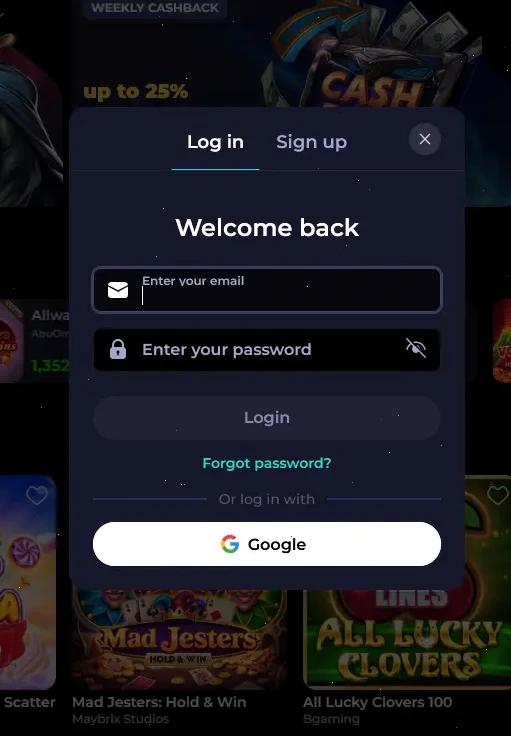
On Android 9.0 or higher, open Chrome or your default browser and visit the site. On iOS 14.0 or higher, use Safari or Chrome. The login form scales automatically to your screen size. Enter your registered email and password exactly as set during registration, then tap the confirm button. For quicker return access, add the site to your home screen as a PWA-style shortcut so you reach the login screen in one tap.
Highflybet does not have a standalone native application on Google Play or the App Store. The full login experience, including access to your AUD cashier, pokies from Pragmatic Play and BGaming, live tables from Evolution Gaming and the sportsbook, is available through the mobile browser session described above. A home screen shortcut replicates the feel of a dedicated app without any installation.
Highflybet accounts use an email address and password combination as the primary login method. Two-factor authentication (2FA) can be activated from within the account settings panel after logging in for the first time. Once 2FA is enabled, a second verification step is required at each login, which significantly reduces exposure to unauthorised access even if the password is ever compromised. There is no social login or third-party sign-in option; each account is tied to the email address confirmed during registration.
Account security at Highflybet is maintained through a layered approach that covers login monitoring, payment verification and optional 2FA. All sessions run under TLS encryption, which protects credentials and account data during transmission. Unusual activity, such as repeated failed login attempts or access from an unrecognised device, may trigger a temporary security review before play continues.
The same-name payment rule extends the security layer to banking: deposits and withdrawals must use methods verified in the same name as the registered account. Failure to match these details can result in payout delays or an additional review. KYC documents, including an Australian passport or driver’s licence and a proof of address such as a utility bill or a bank statement from Commonwealth Bank, ANZ or Westpac, must be submitted before the first withdrawal is approved.
Biometric login, such as Face ID or fingerprint on a mobile device, is not a separate Highflybet feature but can be used where the device’s browser supports biometric autofill of saved credentials.
Most login issues fall into a small number of categories, and each has a straightforward fix.
Incorrect email or password is the most common cause of a failed login attempt. Double-check that the email entered matches the one used at registration, and confirm there are no extra spaces or characters. Passwords are case-sensitive, so check that caps lock is off.
If a password has been forgotten, select the forgot password link on the login page. A reset link is sent to the registered email address. If the email does not arrive within a few minutes, check the spam or junk folder, since automated emails from offshore casino platforms can be filtered by some Australian mail providers.
Several consecutive failed attempts may trigger a temporary account lock as a fraud-prevention measure. If this happens, wait a short period or contact live chat, which is available 24/7. For persistent access issues or a suspected unauthorised login, email [email protected] immediately so the team can review the account and, if necessary, freeze it to prevent further access.
KYC-related holds sometimes prevent access to certain account functions. If a withdrawal request has triggered a verification requirement, the account remains accessible for play but payouts are held until the document review is complete. Submit an Australian passport or driver’s licence plus a recent proof of address to the verification team to clear this as quickly as possible.
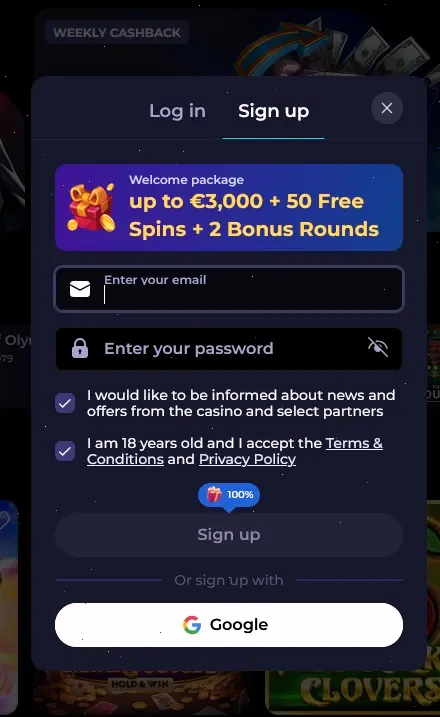
Registering with Highflybet takes under three minutes and is completed entirely through the browser. Players fill in a registration form with a valid email address, a password that meets the security requirements, full name, date of birth, country set to Australia and a phone number, then select AUD as the account currency. A confirmation email activates the account. Players must be 18 or older to register, and only one account is permitted per person, household and IP address. Once the account is active, the welcome package and all ongoing promotions become available, with the four-part casino deposit match reaching up to $3,900 plus 150 Free Spins.
Highflybet Login - Frequently Asked Questions
Use the email address you entered when registering your Highflybet account and confirmed via the activation link sent at sign-up.
Select the forgot password option on the login page, enter your registered email, and follow the reset link sent to your inbox; check spam if the email does not arrive within a few minutes.
Yes, the login page works in any updated mobile browser on Android 9.0+ or iOS 14.0+, and no APK or App Store download is required.
Contact the Highflybet support team via live chat or by emailing [email protected]; the team is available 24/7 and will guide you through the account recovery process.
Ready to Play? Log In to Highflybet Now
Grab 120% up to A$3,900 and 150 free spins.
Enter the Casino Players must be 18 or older. Gambling involves risk and can become addictive. All bonuses are subject to terms and conditions.